Retrieval Evals: compare retrievers on recall, precision and MRR before promoting one

We run a lot of enterprise evaluations. One question comes up again and again. How do you know the agent is giving accurate answers? It is the right question to ask. But most wrong answers are not the model's fault. The correct text was sitting in the knowledge base the whole time. The retriever never handed it to the model.
In the latest Tars release, you can open up the retriever and test it yourself. The feature is Retrieval Evals. It turns retrieval tuning into a controlled experiment. There are four setup steps. Then you run one evaluation and promote the winner.
Answer accuracy is decided before the model writes a word
When a customer asks a question, your AI agent does not read the entire knowledge base. A retriever searches it and passes a small set of passages to the model. The model writes its answer from those passages and nothing else.
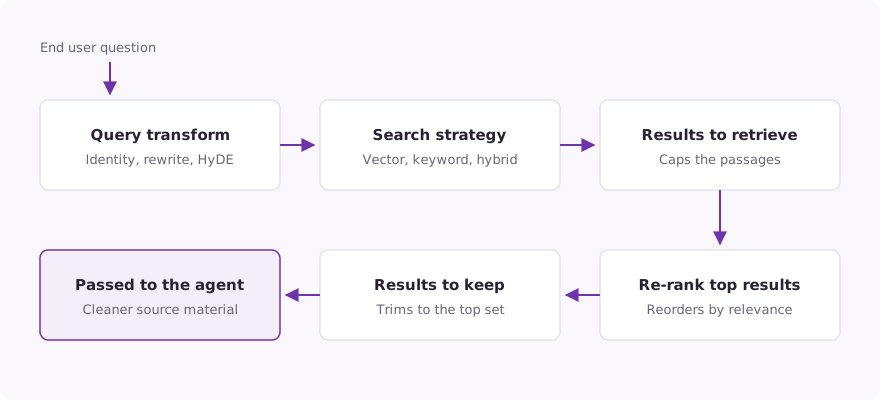
A retriever in Tars is a named search configuration. It runs every question through five stages: a query transform, the search itself, a cap on how many results to retrieve, an optional re-rank step, and a limit on how many results to keep. Only then do the passages reach the agent. You can change each stage, so two retrievers over the same documents can return very different passages.
You could always hand-test one retriever. Type in a real question and look at what came back. What you could not do was compare retrievers. Hand-testing tells you whether a retriever works. It does not tell you which one works best. Retrieval Evals answers that second question with evidence: four setup steps, then one evaluation.
Step 1: Get your knowledge into the knowledge base
A knowledge base in Tars takes two kinds of source: websites and files. Files can be PDF, Markdown, text, or HTML.
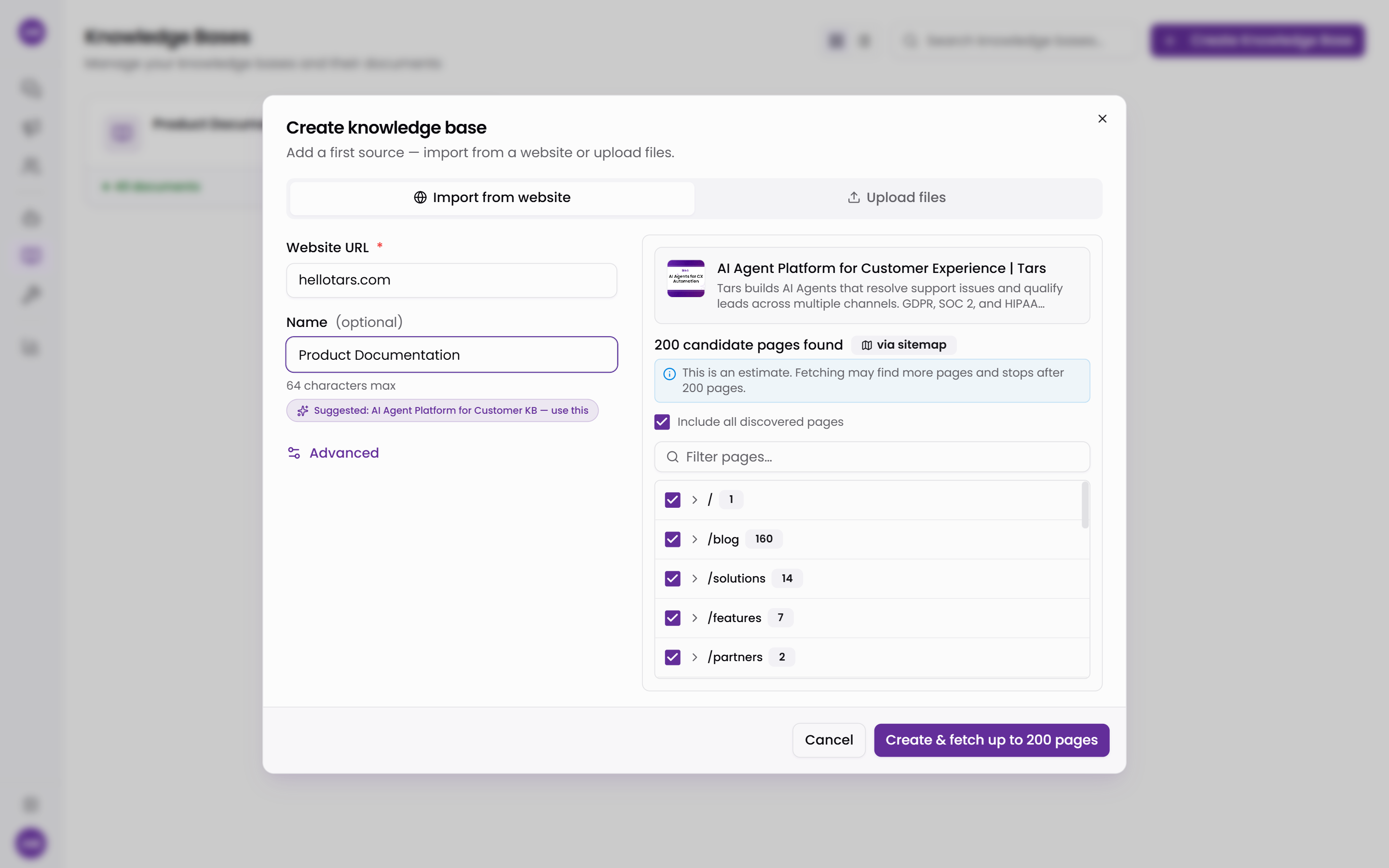
The website import starts with discovery. You enter a URL. Tars finds the site's pages by reading its sitemap and following links from the page you gave it, then shows them as a tree grouped by path. You pick what gets imported. Include everything, uncheck whole sections, or exclude path globs like /blog/*.
Step 2: Add retrievers, including one you build yourself
Once the documents are in, go to the Retriever tab. A knowledge base can hold several retrievers side by side, and the Add a retriever picker gives you four cards.
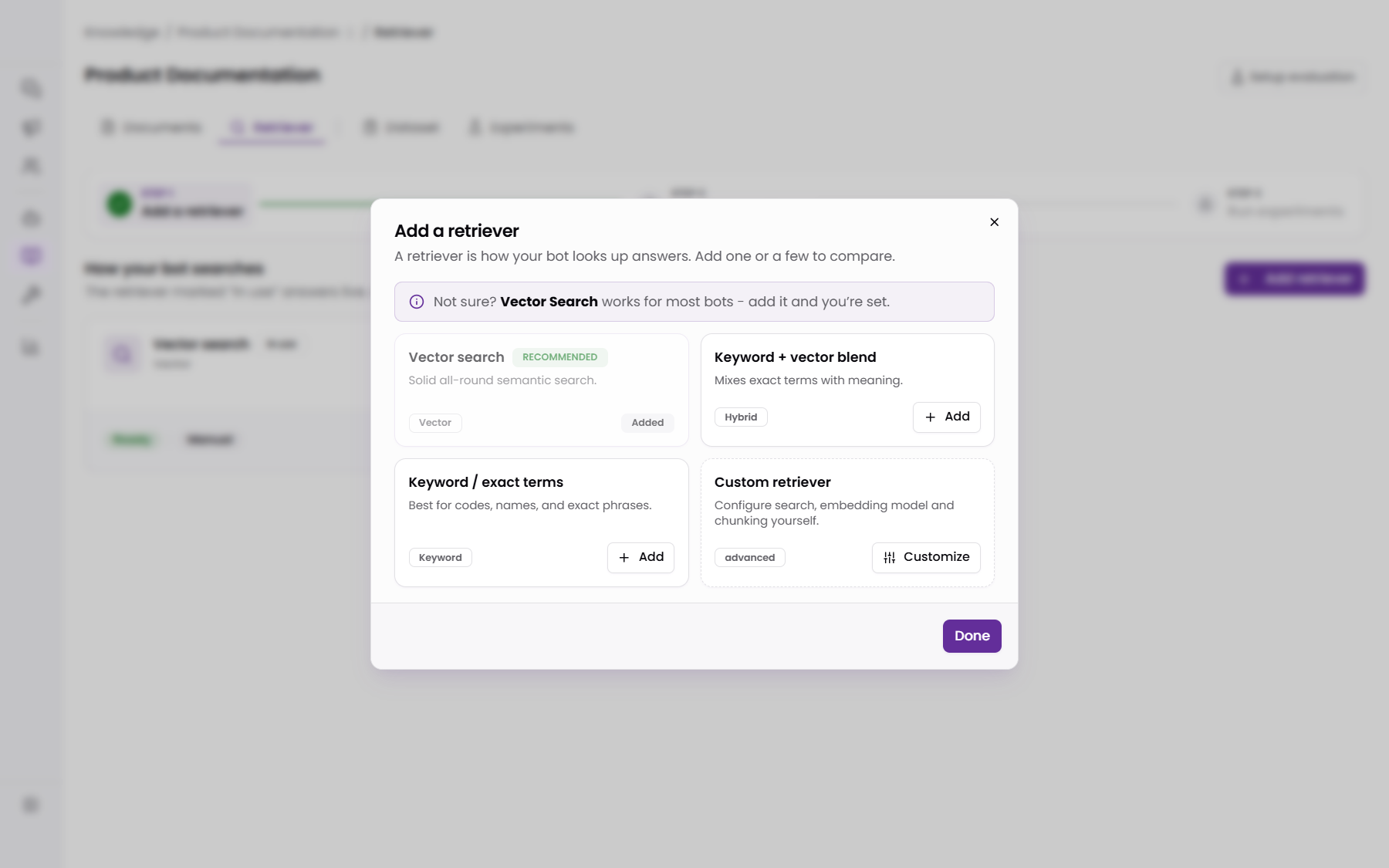
Three are ready-made presets, one per search strategy:
- Vector search (the recommended default): meaning-based search using embeddings. Use it for normal, natural-language questions.
- Keyword + vector blend: hybrid search that mixes exact terms with meaning. Use it when you want the widest coverage.
- Keyword / exact terms: BM25-style lexical matching. Use it for codes, product names, and precise phrases.
The fourth card is Custom retriever. It opens a Build from scratch dialog where you set every stage of the pipeline yourself.
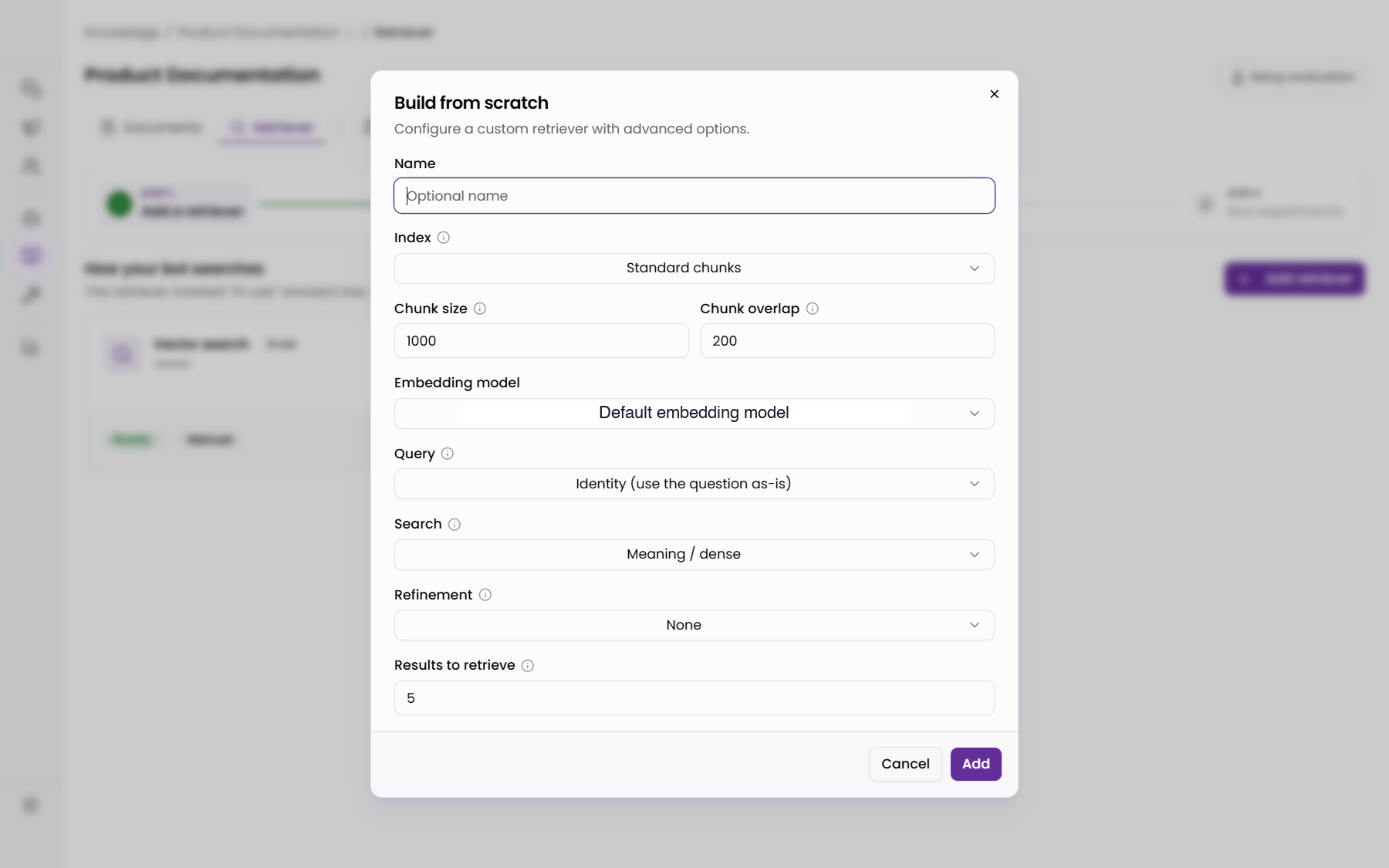
Here is what you can set:
- Query transforms run before the search. Identity uses the question as-is. Rewrite fixes typos and grammar first. Multi-query searches several rewordings and merges the results. Step-back searches a broader version of the question. HyDE drafts a likely answer, then searches with that draft.
- Chunking: standard chunking cuts documents into fixed-size pieces with an overlap, so a sentence split at one boundary appears whole in the neighboring chunk. Parent-child chunking indexes small child chunks so matching is precise, then swaps each matched child for its larger parent section at answer time. That way long documents keep their context.
- Search strategy and embedding model: pick vector, keyword, or hybrid. On the vector and hybrid strategies you also pick the embedding model.
- Re-ranking and result caps: results to retrieve sets how wide you cast the net. Results to keep then trims that list to its final size. The optional re-rank step sits in between: it reorders the wider net with a more accurate model before the trim.
Step 3: Index the data through each retriever independently
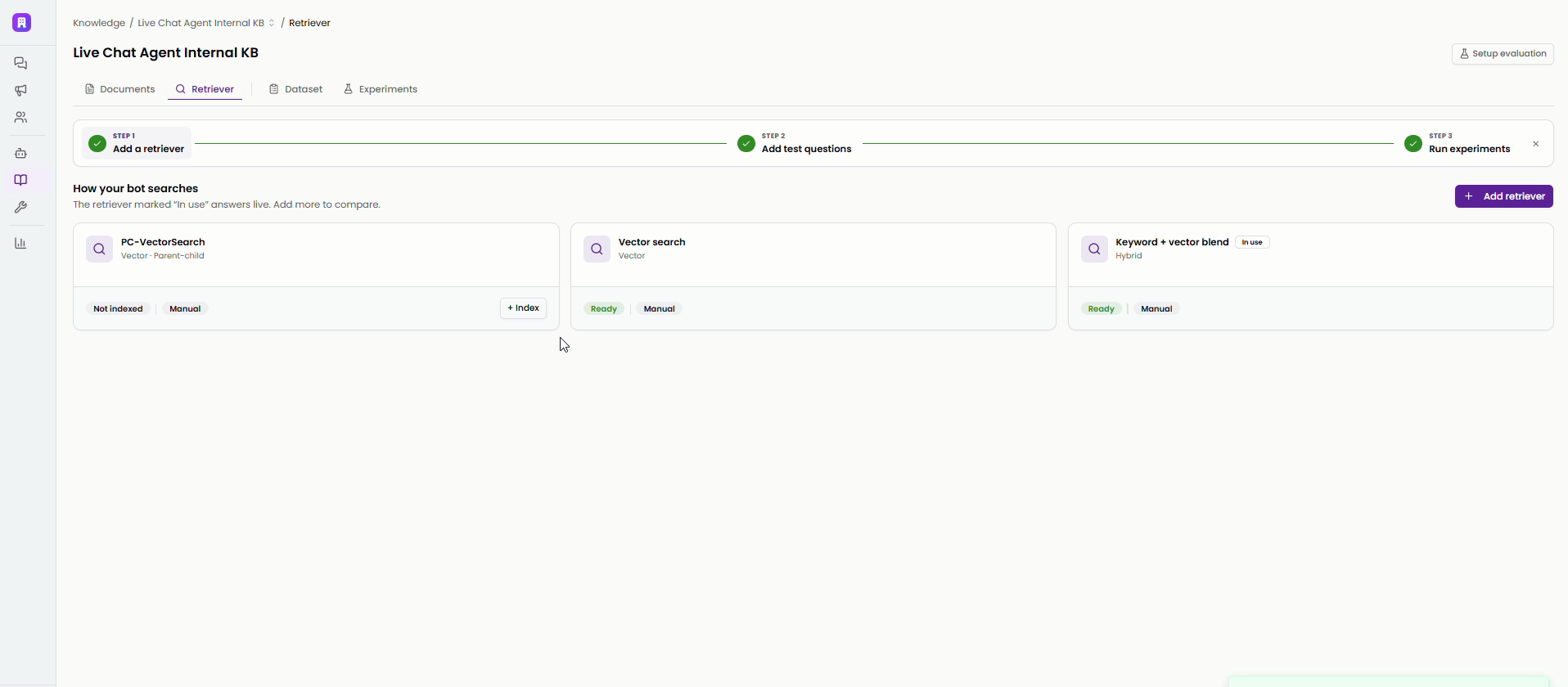
Every retriever builds and owns its own index, so a parent-child hybrid configuration never interferes with a plain vector one. Each index has a clear state: Not indexed, Indexing, Ready, Needs reindex, Updating index, or Error. A retriever does not join the agent's Knowledge Retrieval tool until its first build reads Ready.
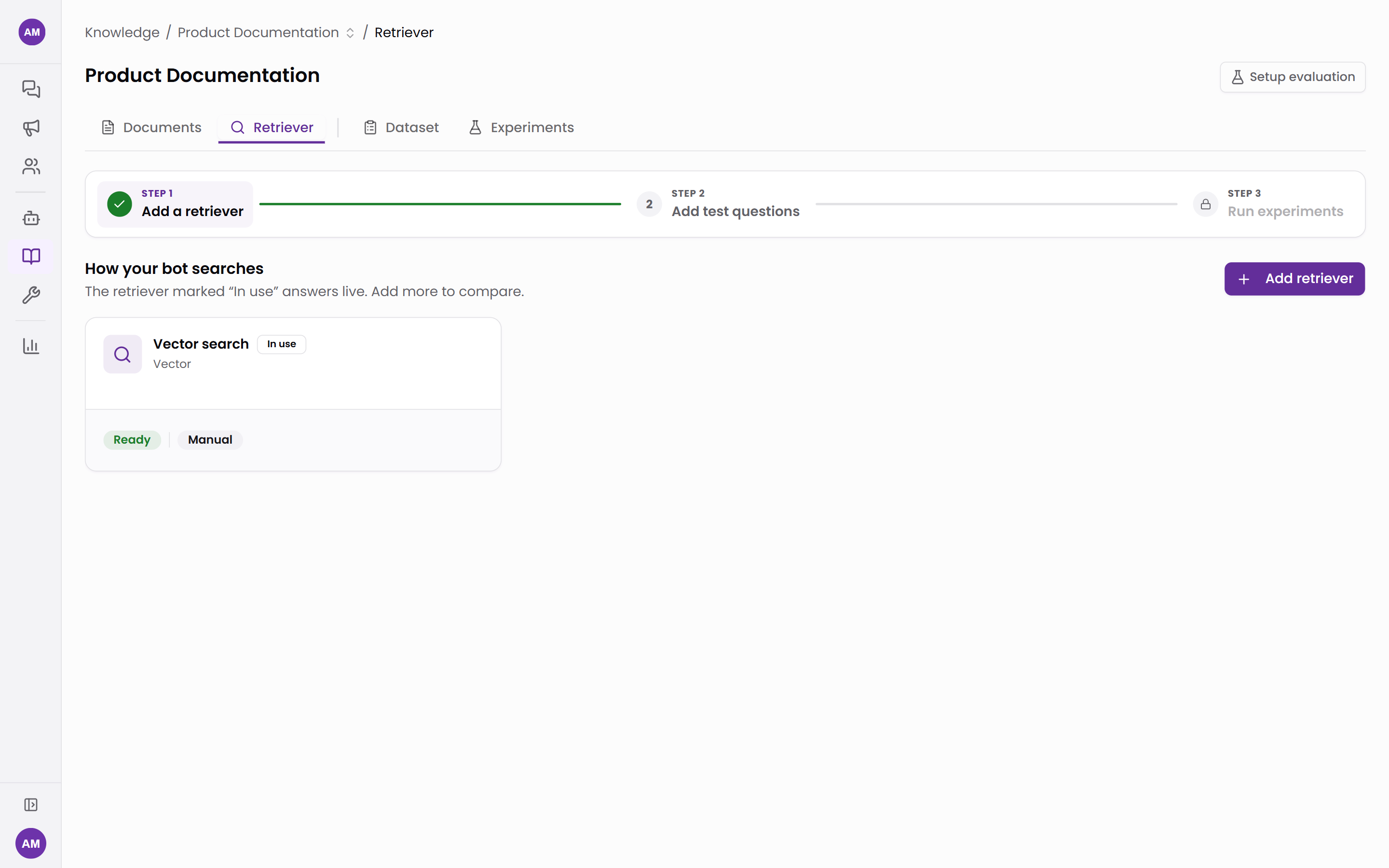
Tars is open with you about stale indexes. When documents change after a build, a retriever keeps answering from the index it already has, and an alert tells you live answers are behind your documents. You set each retriever to Auto reindex or Manual. Auto rebuilds after a scheduled crawl. Edits you make to a document yourself still need a manual reindex. Either way the agent keeps answering from the current index until the new one is ready. Indexing never shows up as downtime for your customers.
Step 4: Generate the test data, then make it yours
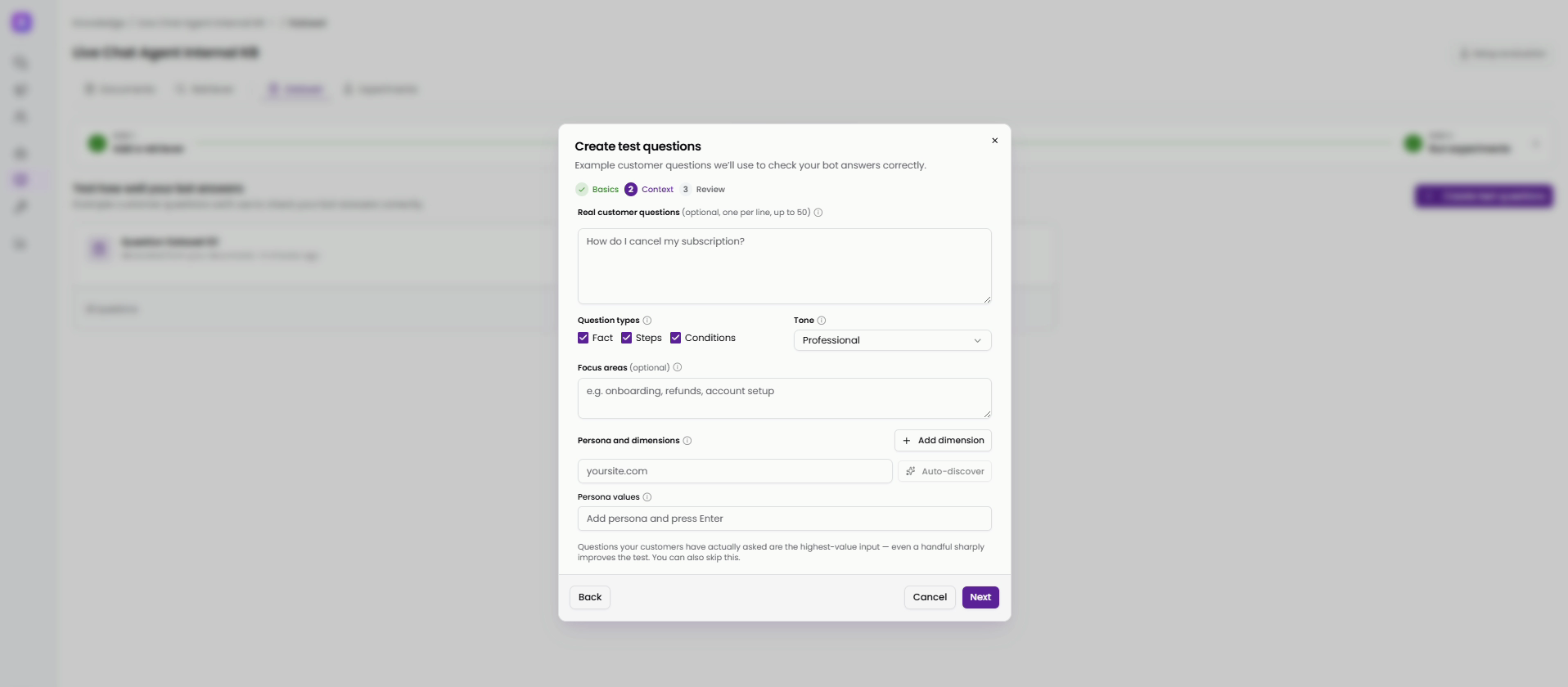
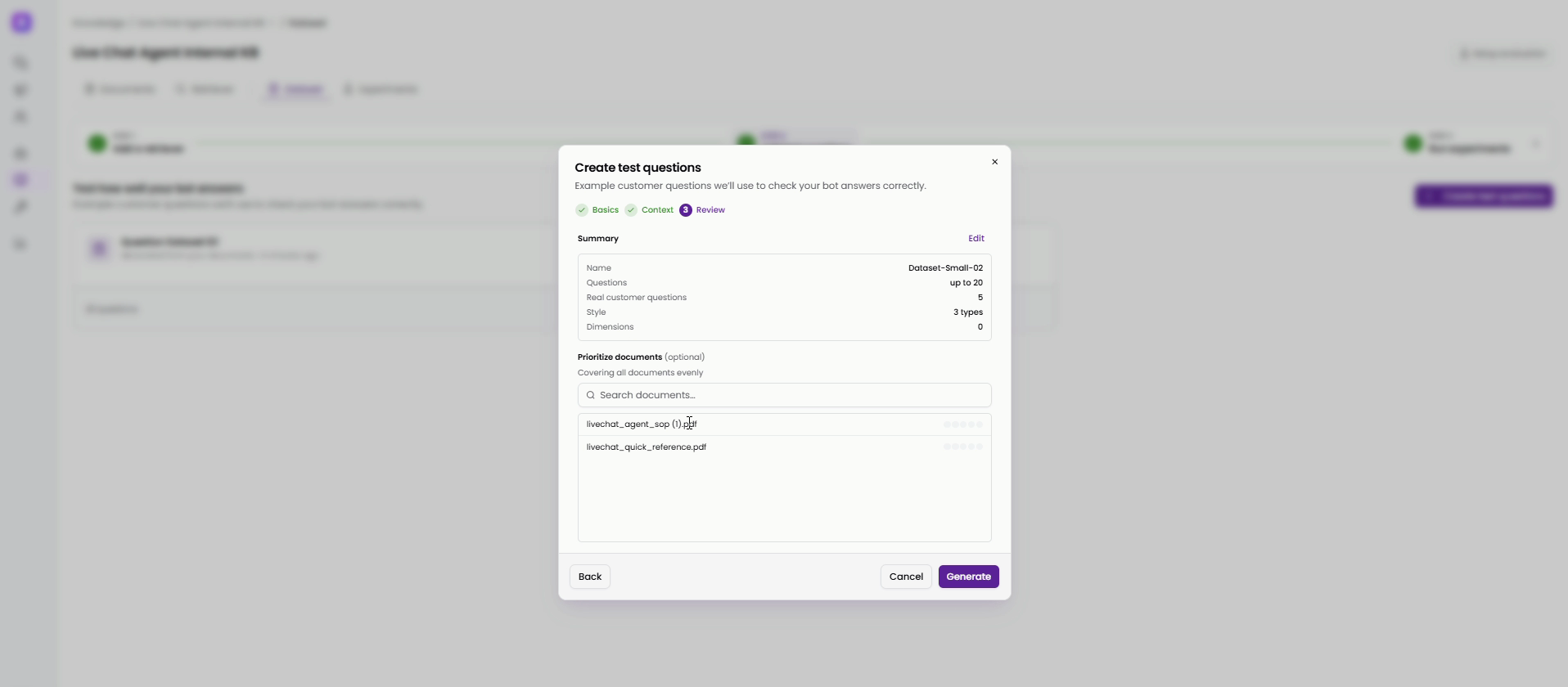
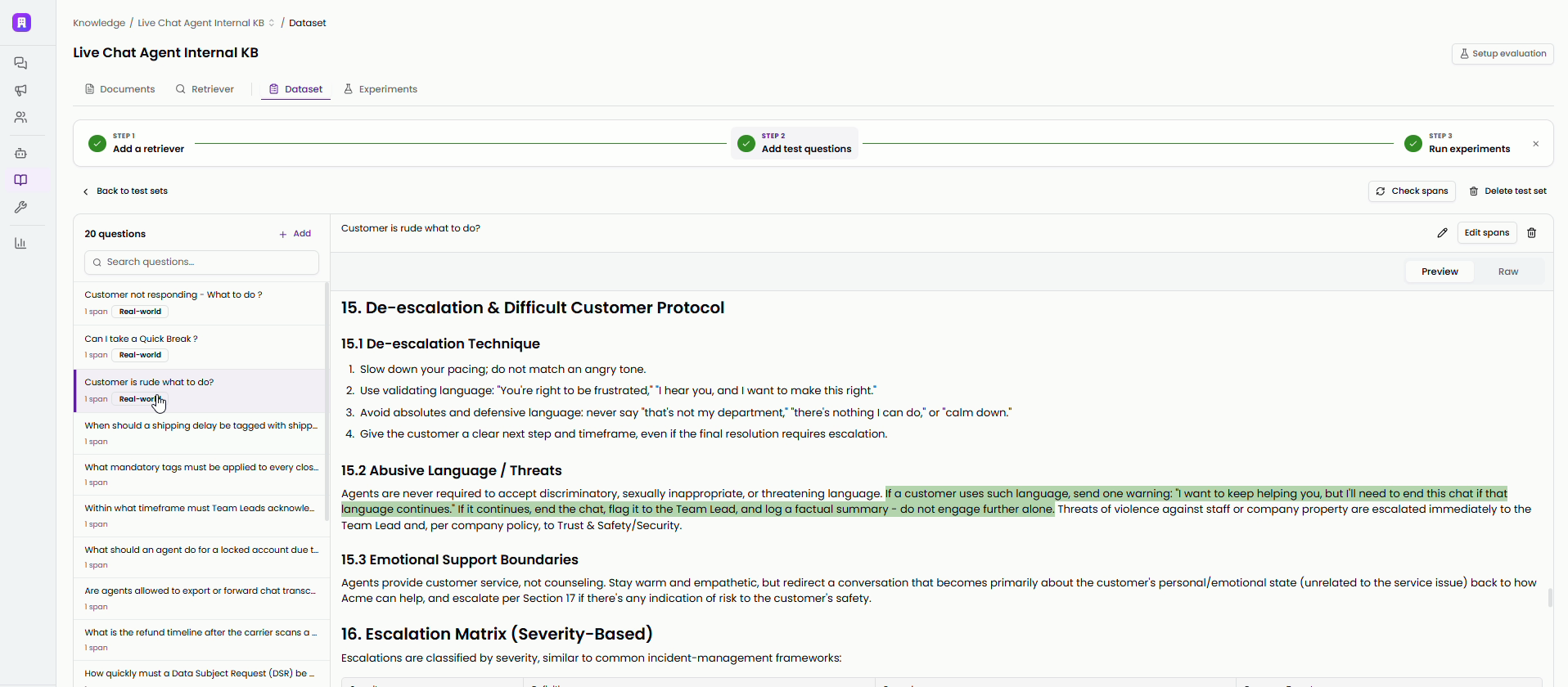
The Dataset tab is where the test questions come from. Tars writes them from your documents, and you control how. Set the number of questions, the question types (facts, step-by-step procedures, conditional rules), the tone, the customer personas asking, and the documents to prioritize.
You can edit every question in the finished set. Each question carries an answer span, which is the exact highlighted passage in the source document that counts as the correct answer. Every score is computed against that span, so getting it right matters. You can move it, tighten it, or mark a new one and save it.
Run experiments: compare retrievers on the same questions
The Experiments tab is where every retriever meets the same test set. Pick the ones you want to compare and run the evaluation. Each one answers the same questions against its own index.
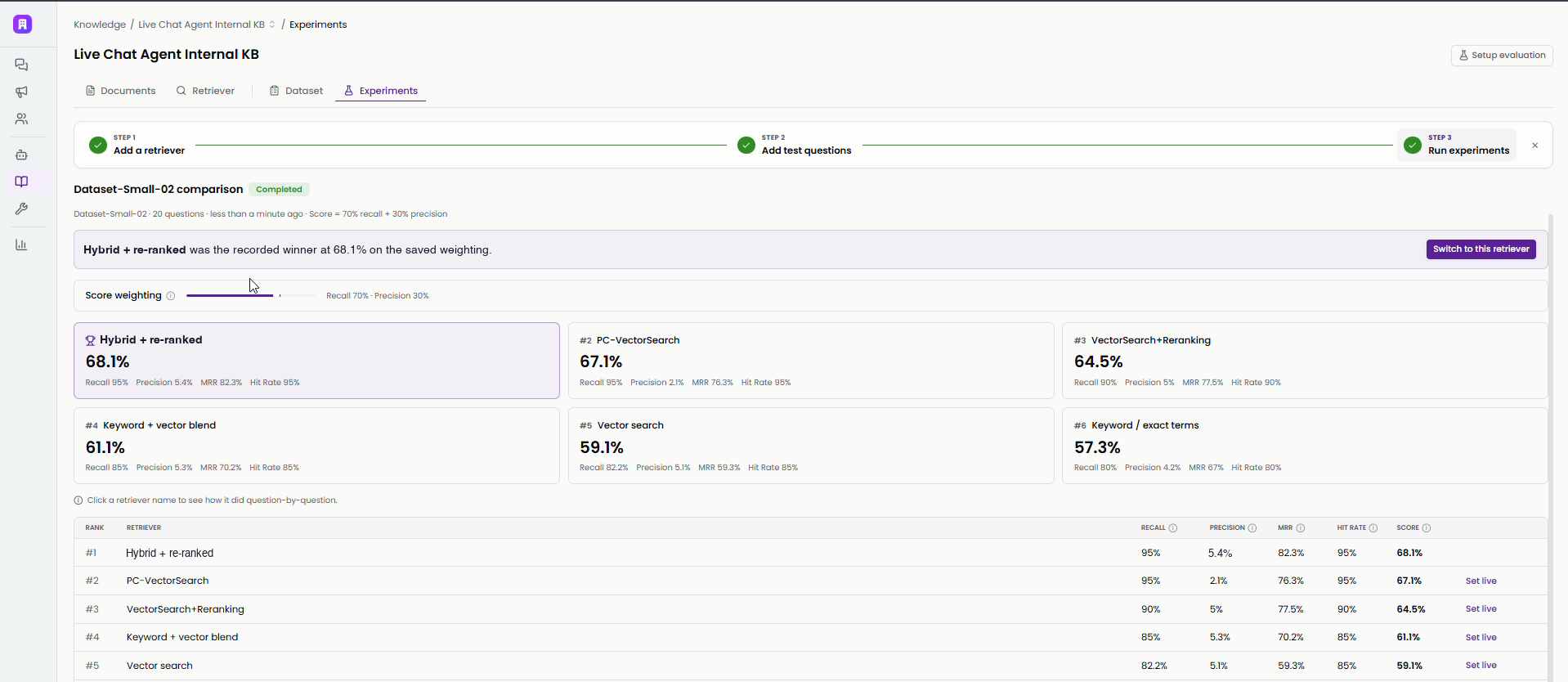
The ranking score is a weighted blend of recall and precision, and you control the weighting with a slider. An agent answering regulated healthcare or banking questions usually needs complete answers, so give recall more weight. An agent doing quick policy lookups needs tight passages, so give precision more weight. You decide what best means, and the ranking follows.
Each retriever gets four scores. Each score answers a question you would actually ask:
- Recall: how much of the expected answer did the retrieved chunks actually contain?
- Precision: of everything retrieved, how much was actually the answer?
- MRR (mean reciprocal rank): how high up did the first correct chunk appear, averaged across every question? Rank one scores highest, and the score falls as the right chunk sinks lower.
- Hit rate: did the answer show up at all, anywhere in the retrieved chunks? It is the quickest failure signal: a complete miss shows up here first, and it pulls recall and MRR down with it.
Four scores instead of one, because they often disagree, and the disagreement is useful. A retriever can capture the complete answer and score perfectly on recall while burying it in several times as much unrelated text. That is what precision catches. Your customers then see an agent that technically has the answer but pads it or picks the wrong detail out of the noise. A single blended number would hide that pattern.
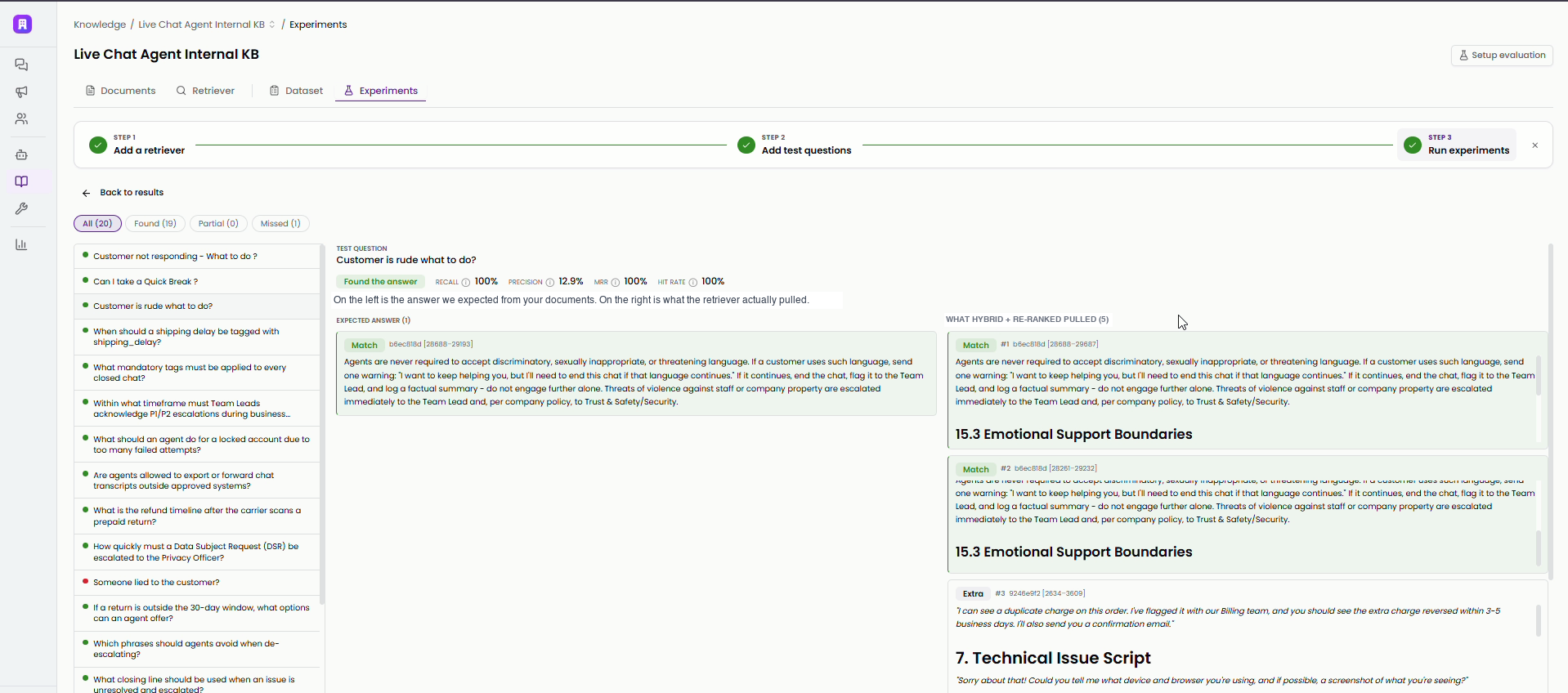
You can then open any single question. On one side is the answer you expected from your documents. On the other is what the retriever actually pulled, chunk by chunk, each labeled Match or Extra. You can filter the whole question list by Found, Partial, and Missed.
Promote the winner into the knowledge base
An experiment should end with a decision. The retriever marked In use is the live default answering real customers. Every other retriever you have added sits next to it, and each card shows its own index state.
When the experiment gives you a winner, click Make default to promote it. Promotion swaps the live default without rebuilding anything. A retriever cannot be promoted until its index is Ready, so the switch is instant and customers never hit a gap. You can try a better configuration without risking the live experience.
What Retrieval Evals will not score
Retrieval Evals tells you when it cannot score a question, instead of scoring it anyway.
If a source document is deleted or changed, Tars flags the questions built on it for span review. The next experiment skips those questions and reports how many it skipped. Skipping is the right call, because scoring them silently would corrupt the results. If a new document contains an answer that was missing, point the question's answer span at the new passage and the question rejoins the test.
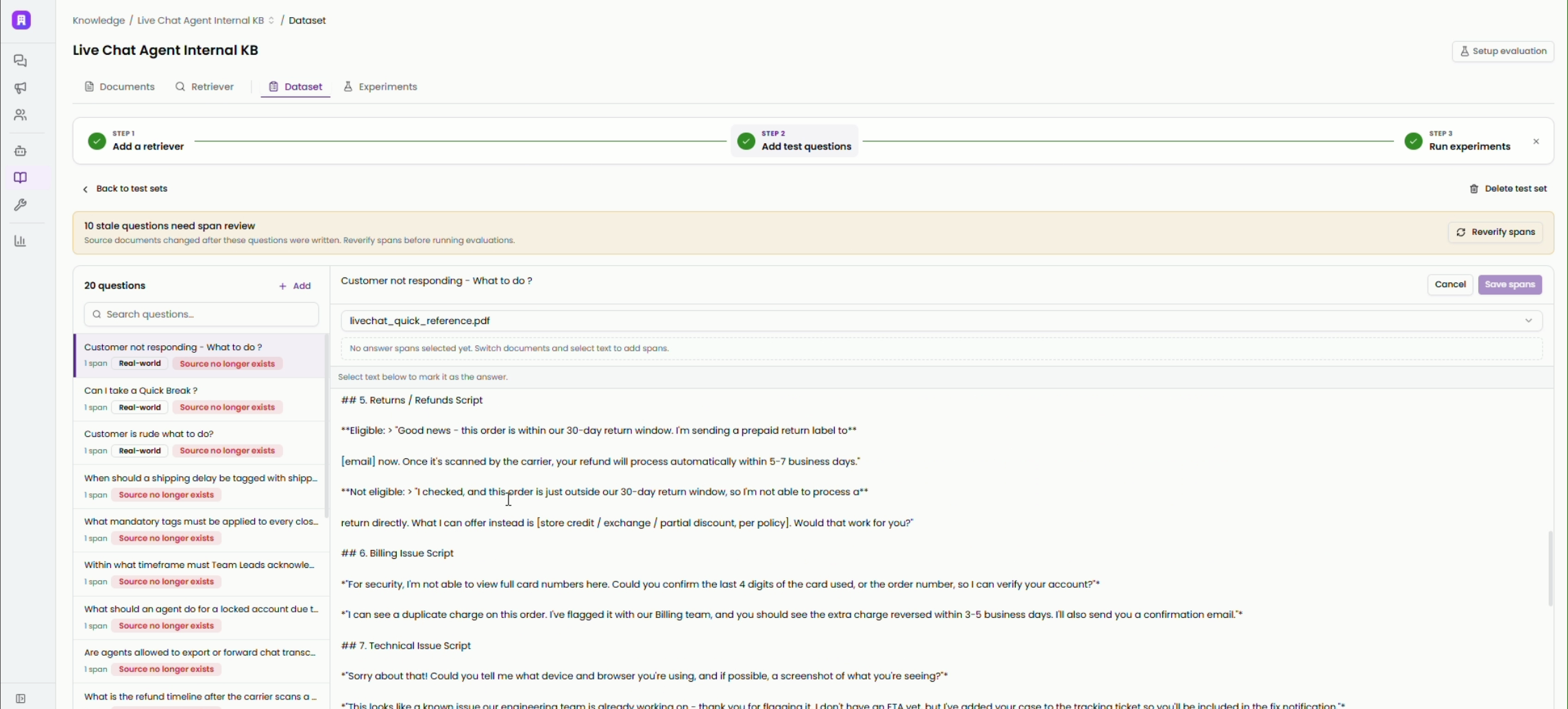
The same goes for indexing. A retriever answers from the index it already has, so an experiment can show a retriever missing an answer simply because it has not reindexed new content. Fix that with a reindex and a re-run. You never have to rebuild the knowledge base.
This part of the product is early and will keep improving. The workflow underneath it is stable: import, configure, index, test, compare, promote.
What this changes for a CX team
When your AI agent gives a wrong answer, your team can see why. Retrieval is now something you can inspect against ground truth taken from your own documents. Your team can set up a better retriever, prove it on your real customer questions, and promote it the same day, without a rebuild and without a vendor ticket.
Most platforms keep retrieval hidden and ask you to trust it. In Tars you can open it up, change it, and prove the change with the experiment results. AI agent answer accuracy becomes a number you can check.
Frequently asked questions
What is a retriever in an AI agent platform?
A retriever is the search pipeline between your knowledge base and the language model, and you configure it. In Tars, every question passes through five stages: a query transform, the search strategy, a cap on results to retrieve, an optional re-rank step, and a limit on results to keep. The passages that survive are what the model writes its answer from.
What kinds of retrievers can you use in Tars?
Three presets and a custom path. Vector search matches by meaning. Keyword search matches exact terms like codes and product names. The hybrid blend mixes both. The custom retriever lets you build from scratch: chunking (standard or parent-child), embedding model, query transform (Identity, Rewrite, Multi-query, Step-back, or HyDE), search strategy, re-ranking, and result counts.
Do I have to write the test questions myself?
No. Tars writes the test set from your documents, with controls for question count, question types, tone, and customer personas. You then edit it like any document. Rewrite questions, add real questions from tickets and call logs, and adjust the exact answer span each question is graded against.
Should I weight recall or precision higher?
It depends on the deployment. Weight recall higher when an incomplete answer is the bigger risk. That is common in regulated industries where a partial policy answer misleads someone. Weight precision higher when tight, exact responses matter most. Tars gives you the weighting as a slider, so the experiment ranking follows your definition of a good answer.
Can changing retrieval take my live AI agent down?
No. The retriever marked In use keeps answering from its current index while a new or updated retriever indexes in the background. Promotion swaps the live default only once the new index is ready, so customers never hit a gap while you tune answer accuracy.
Is Retrieval Evals the same as evaluating the whole AI agent?
No. Retrieval Evals measures whether retrieval finds the right information in your knowledge base, which is the foundation of a correct reply. Agent Evals asks a broader question: did the customer's issue actually get resolved across the full conversation? Strong retrieval is the prerequisite for everything above it.
Build innovative AI Agents that deliver results
Ish is the co-founder at Tars. His day-to-day activities primarily involve making sure that the Tars tech team doesn’t burn the office to the ground. In the process, Ish has become the world champion at using a fire extinguisher and intends to participate in the World Fire Extinguisher championship next year.


Recommended Reading: Check Out Our Favorite Blog Posts!
Tools & Integrations: built-in, connected and custom tools an AI agent can call
Identity and Data Protection: personal data can be redacted or masked before storage
Generative UI: your AI agent renders tables, charts and forms inside the chat